





Fixed Wing
Helicopter
Flight Control
Maritime Control

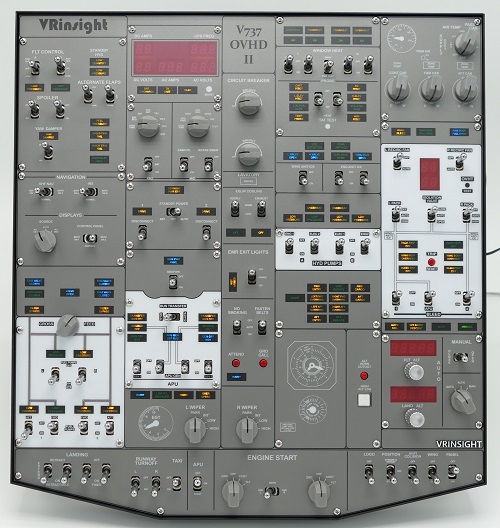
V737 Overhead pro

Code 20230626031228
Selling Price 1,100.00
Manufacturer VRinsight
QTY
- +
Totel Price
Buy Now Add to Cart


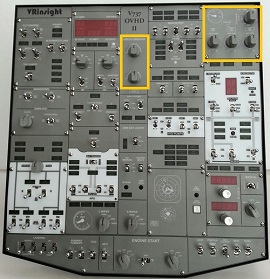
Inside the yellow box is a dummy switch.


VESA mounting holes (VESA 100) to use the monitor bracket.
It can be installed at the desired location using the computer monitor arm.
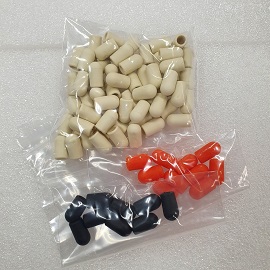


Rubber Switch Cap


Installation Example (Sep. 2025, Australian Customer)


Features


* Full functional inputs:  
  70 toggle switches, 
  9 Rotary switches, 
  2 Rotary encoders
* All switchable 96-annunciators
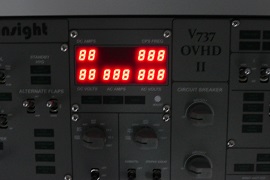
* 7-Segment display for Flight ALT, Landing ALT, 
  AC/DC Electric variables and duct flow
* USB 2.0 compliant connection 
  for control interface
* End cap set : Plastic Black, Red and White color
* Install the overhead : Adjustable single computer monitor arm is available.

* It supports iFly 737NG & PMDG 737NGX in FSX
* It supports PMDG 737NGX in P3Dv4
* It supports MSFS2020 with Spadnext program.

  Below is our customer's review of use.
 I used your software to do an initial test 
    to make sure everything was working 
    before I finish setting it up for my first flight.
    I then used Spad to load a profile 
    for the PMDG 737 in MSFS. 
    It worked perfectly.
    I use a snippet, 
    which is what they call a profile 
    for specific devices. 
   The number is 6362. 
    It can be searched 
    from the online snippets section. 
    With this profile everything works on the panel 
    with the PMDG 737 in MSFS."


  How to install with SPAD 
   1. Install or upgrade to the ‘Complete’ version of SPAD.neXt  
      https://www.spadnext.com
   2. Start MSFS 2020 as usual except for SPAD. 
      Select a World Map location and click Ready to fly. 
   3. Open Device Manager in Control Panel 
      and expand the Ports (COM & LPT) section. 
   4. Connect the 737 overhead panel to a USB port. 
      Find the new port number 
      under the Ports (COM & LPT) section. 
      Should show ‘USB Serial Port (COMxx)’ 
   5. Start SPAD. 
      Go to Settings, Devices, Serial Devices 
   6. Click Add New Device. 
      Select the new Com port. 
      Select VRinsight as the protocol, then OK. 
      Click the Save button and close SPAD. 
   7. Restart SPAD. 
      The message stating 
      “Turn Power Switch on the device off, 
      Wait 2 seconds, and turn back on” 
      should appear. Do as it says. 
   8. Go to the panel section 
      and you should see V737H (COMXX). 
   9. Click on any button 
      and load the online snippet 6362 
      and the panel should be active. 
  10. If you do not receive the message
      “Turn Power Switch on …” 
       or the panel is not active, 
      close everything and reboot the computer, 
      then reload FS and SPAD.

* It is compatible with Microsoft Windows 7 or newer
* Dimension:   Width: 41.5cm / 16.3inch,   
                 Height: 4cm / 1.6inch,   
                 Length: 44.5cm / 17.5inch
* Weight : 7Kg
* One year warrant
* C/S Center e-mail : vrinsight101@gmail.com
* Please refer to the manual and install software for V737 Overhead

  • Orders will be shipped by DHL Express within 3 to 6 weeks due to custom-made.

  • You can track your order through http://www.dhl.co.kr/en.htm


  • VRinsightshop may pack your orders together.
  • If you discover an error in your order requiring a change or cancellation, please contact us immediately.    After an order is shipped, it cannot be cancelled.

  • The selling price do not include customs duties and import tax for customs clearance.

  • H.S Code : 9504.90-9090

  • If you want to make bank transfer, Paypal invoice for credit card payment, 

  • please email to info@vrinsight.com or vrinsight101@gmail.com.

    1. If you are not satisfied with your order, you may return it within 30 days from the date of purchase.

    2. Before sending it back, you should receive prior authorization. To get authorization, contact info@vrinsight.com.

    3. All non-defective products should be in their original packages and in a good shape with all provided accessories.

    4. Returned packages must include e-mail of authorization in the package, as well as a copy of your printed invoice. If you do not have your invoice, please include your name, address and phone number so we may contact you regarding any questions we may have. If customers do not included e-mail of authorization, the return may be rejected.

    5. Please allow up to 15 business days to process your return from the time it reaches our warehouse.

    6. We are not liable for lost or untraceable packages. When returning any items to VRinsight.com, please use a postal delivery confirmation or tracking number.

    7. If you want to get refund, we will deduct 15% of product price for repackaging.  We are not responsible for customer shipping costs to return non-defective or incorrectly ordered products.

    Review

    Share your opinion of this product. Your review will be rated based on its usefulness.

    Product Q&A

    Any questions related to this product, we will try our best to provide a response.
    Q
    dlmin64
    2024/09/21
    A couple of switches have come loose and have fallen inside the case. How do I open the case to resecure them?
    • 1